
Note
Go to the end to download the full example code.
Circles, Wedges and Polygons#
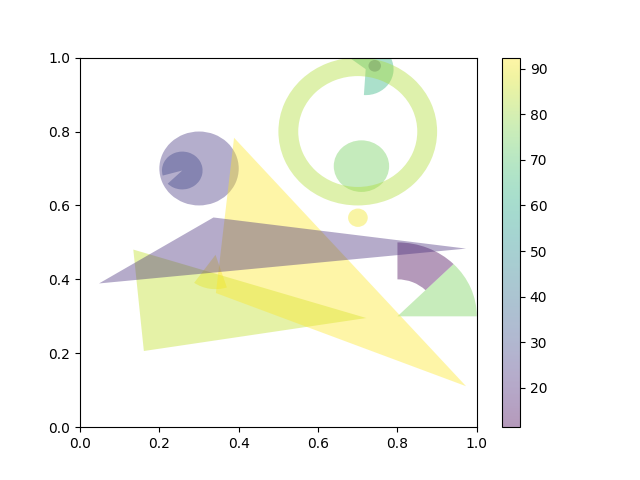
This example demonstrates how to use collections.PatchCollection.
See also Reference for Matplotlib artists, which instead adds each artist separately to its own Axes.
import matplotlib.pyplot as plt
import numpy as np

from matplotlib.collections import PatchCollection
from matplotlib.patches import Circle, Polygon, Wedge

# Fixing random state for reproducibility
np.random.seed(19680801)


fig, ax = plt.subplots()

resolution = 50  # the number of vertices
N = 3
x = np.random.rand(N)
y = np.random.rand(N)
radii = 0.1*np.random.rand(N)
patches = []
for x1, y1, r in zip(x, y, radii):
    circle = Circle((x1, y1), r)
    patches.append(circle)

x = np.random.rand(N)
y = np.random.rand(N)
radii = 0.1*np.random.rand(N)
theta1 = 360.0*np.random.rand(N)
theta2 = 360.0*np.random.rand(N)
for x1, y1, r, t1, t2 in zip(x, y, radii, theta1, theta2):
    wedge = Wedge((x1, y1), r, t1, t2)
    patches.append(wedge)

# Some limiting conditions on Wedge
patches += [
    Wedge((.3, .7), .1, 0, 360),             # Full circle
    Wedge((.7, .8), .2, 0, 360, width=0.05),  # Full ring
    Wedge((.8, .3), .2, 0, 45),              # Full sector
    Wedge((.8, .3), .2, 45, 90, width=0.10),  # Ring sector
]

for i in range(N):
    polygon = Polygon(np.random.rand(N, 2), closed=True)
    patches.append(polygon)

colors = 100 * np.random.rand(len(patches))
p = PatchCollection(patches, alpha=0.4)
p.set_array(colors)
ax.add_collection(p)
fig.colorbar(p, ax=ax)

plt.show()
References
The use of the following functions, methods, classes and modules is shown in this example:
Total running time of the script: (0 minutes 1.001 seconds)